
By Jacob Bradley September 22, 2026
To migrate an ecommerce site to a new host without breaking payments, keep the old and new environments available in parallel, inventory every payment dependency before changing DNS, validate SSL and gateway callbacks on the new server, confirm renewal schedulers are operating, and test a live payment, refund, and webhook before and immediately after cutover.
A migration is not finished because product pages load and the cart accepts an item. Checkout can look normal while asynchronous payment events, saved-payment references, refunds, subscription renewals, or reconciliation silently fail.
| Payment Component | What Can Break | What to Verify Before Cutover |
| Checkout | API connectivity, HTTPS, sessions | Complete live test order |
| Webhooks | Wrong endpoint, blocked request | Test delivery and response |
| Callback/return URLs | Redirect or routing failure | Confirm URLs and status codes |
| Recurring renewals | Scheduler or worker missing | Inspect or trigger scheduled renewal |
| Saved cards | Token/reference or plugin mismatch | Confirm existing tokenized methods |
| Refunds | Gateway configuration/API failure | Test refund workflow |
| DNS | Mixed old/new traffic | Plan TTL and monitor resolution |
| SSL/TLS | Certificate/hostname problem | Validate production hostname |
| IP rules | Webhook/API rejection | Review allowlists where used |
| Reconciliation | Missing transaction metadata | Match transaction to order |
How to Migrate an Ecommerce Site to a New Host Without Breaking Payments
Treat the job as a controlled transfer of the entire payment lifecycle: customer session → checkout → gateway authorization → return flow → webhook → order update → scheduled renewal → refund → reconciliation.
Build the new environment first. Validate its runtime, secrets, TLS, networking, payment plugins, scheduled jobs and cache rules. Then perform the final data sync, change DNS, test payment processing immediately, and monitor both application and gateway signals during the stabilization period.
Payment Components That Commonly Break During a Host Move
Checkout API calls
A checkout authorization can fail because the new server cannot reach the gateway, uses missing credentials, loads a different PHP/runtime version, lacks required libraries, or has an outbound firewall restriction.
Also test sessions. WooCommerce cart and checkout pages contain customer-specific state and should normally be excluded from full-page caching.
Webhook endpoints
A webhook is a server-to-server notification sent after events such as successful payments, refunds, disputes, or recurring charges. Migration can change its routing, certificate, authentication secret, firewall behavior, reverse proxy configuration, or application listener.
A customer can therefore see a successful gateway payment while the store remains stuck at “pending” because the asynchronous notification never reached the application.
Callback and return URLs
Do not confuse customer-facing return URLs with webhooks.
A return or redirect URL controls where the customer’s browser goes after an external payment step. A webhook endpoint receives server-to-server event notifications whether or not the customer returns to your store.
Recurring-payment schedulers
Recurring billing may depend on WP-Cron, WooCommerce Action Scheduler, server cron, queue workers, scheduled PHP processes, or a gateway-controlled billing schedule.
WooCommerce uses Scheduled Actions and Action Scheduler for background work such as subscription payments and webhooks. In its default configuration, Action Scheduler is triggered through WP-Cron, so a host migration should verify not merely that the scheduled-action records moved, but that the mechanism responsible for executing them still runs.
SSL/TLS
A certificate problem can break browser checkout, secure cookies, redirects, gateway callbacks and webhook delivery. Stripe, for example, identifies certificate-chain problems as a cause of webhook TLS errors and currently requires TLS 1.2 or newer for those connections. PayPal likewise documents TLS 1.2 or higher for its API communications.
IP rules and credentials
Some gateways, fraud systems and enterprise integrations use source or destination IP restrictions. If yours does, record those rules before the new server receives traffic.
Likewise inventory live and test API keys, OAuth credentials, merchant identifiers, environment variables and webhook signing secrets. Copying WordPress files does not guarantee that secrets held outside the database move with them.
Build a Payment Dependency Inventory Before You Change DNS
Inventory the payment stack before touching production DNS.
Record the gateway and processor, gateway plugin and version, merchant identifiers, live and test credentials, signing secrets, tokenization integration and live/test mode.
Then list every webhook endpoint, payment callback URL, return and cancel URL, notification URL, OAuth redirect URL and hosted-payment return address. Include Apple Pay or other domain-validation configuration where relevant.
Document the server dependencies too: PHP/runtime version, extensions, TLS libraries, cron configuration, queue workers, cache exclusions, CDN/WAF rules, outbound API requirements and IP allowlists.
For WooCommerce, inspect the active payment extensions, WooCommerce Subscriptions if used, Action Scheduler, saved payment tokens, custom checkout code, custom webhooks, REST integrations and order-status automation.
WooCommerce’s Payment Token API stores gateway token references in its database, while the exact meaning and usability of those references depends on the gateway integration.
Payment Migration Inventory
| Item | Current Value | New Host Verified? | Test Method |
| Gateway plugin/version | |||
| Live API credentials | |||
| Webhook URL | |||
| Signing secret | |||
| Return URL | |||
| Cron/scheduler | |||
| SSL/TLS | |||
| IP rules | |||
| Cache exclusions | |||
| Subscription jobs |
Keep the Old and New Hosts Running in Parallel
Parallel infrastructure gives you somewhere to roll back while DNS caches expire, but it does not mean two independent production stores should freely accept writes.
Clone production, validate the new server through a hosts-file override or appropriate staging hostname, then perform a controlled final database sync close to cutover.
Uncontrolled dual-write operation can create split orders, inventory divergence, conflicting order numbers, duplicate scheduled jobs and duplicate renewals.
This is particularly important with subscriptions. WooCommerce documents how Subscriptions staging mode protects cloned sites from duplicate automatic payments, but it also warns that a database migration retaining the same domain does not automatically trigger staging mode. The old environment therefore needs deliberate scheduler control before both copies can reach live payment infrastructure.
DNS Cutover Without Checkout Errors
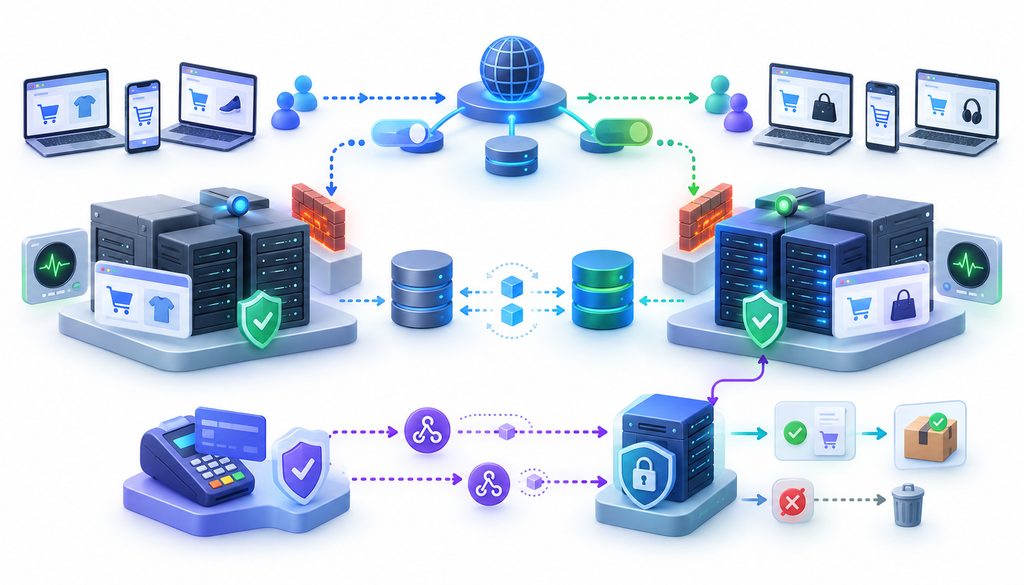
DNS TTL tells recursive resolvers how long they may cache a record. Lowering an appropriate TTL before migration can shorten the useful cache lifetime when you eventually change the record.
There is no universal “correct” migration TTL. DNS providers expose different ranges and architectures; Cloudflare, for example, uses different TTL behavior for proxied and DNS-only records and notes that local caches can still delay when users observe a change.
Example cutover timeline
24–48+ hours before: lower relevant TTLs if appropriate for your DNS setup, confirm DNS access, validate the new host, inventory payment endpoints, test TLS and confirm gateway connectivity.
Cutover window: limit risky content/configuration changes, perform the final data sync, switch DNS, observe both infrastructures and immediately run payment tests.
First 72 hours: retain the old environment where practical, inspect webhook deliveries and gateway logs, watch subscription jobs, look for duplicate orders and reconcile transaction totals against store records.
These are operating windows, not universal DNS requirements.
SSL Certificate Checkout Failure: Why HTTPS Must Be Ready Before DNS Cutover
Validate the production hostname against the new infrastructure before checkout traffic arrives.
Check certificate issuance, hostname coverage, expiration, certificate chain, HTTPS redirects and renewal automation. If a reverse proxy or CDN terminates TLS, validate both edge-to-browser and proxy-to-origin behavior as applicable.
A homepage displaying a padlock proves only that one request succeeded. It does not prove /checkout, REST endpoints, callback routes or webhook paths work correctly.
Cloudflare’s current TLS guidance, for example, documents failures caused by certificate-hostname mismatch and certificate coverage issues.
SSL check: validate the canonical hostname; test checkout directly; follow redirects; verify callback/webhook routes over HTTPS; inspect the certificate chain; test from outside your internal network.
Payment Gateway Webhooks After Migration
Payment gateway webhooks after migration deserve their own acceptance test.
Failures commonly appear as 404 routing errors, 403 WAF blocks, 5xx application errors, TLS failures, signing-secret mismatches or timeouts.
Retry behavior is provider-specific. Stripe currently documents automatic live-mode retries for up to three days using exponential backoff. PayPal currently documents up to 25 delivery attempts over three days for unsuccessful REST webhook deliveries. Do not build your recovery plan around either schedule unless that is actually your provider and integration.
How to Test Webhooks on the New Host
- List every registered gateway endpoint and subscribed event.
- Confirm the production HTTPS route reaches the intended application.
- Compare the gateway dashboard URL with your inventory.
- Send a provider test event where supported.
- Run a low-value live transaction when appropriate.
- Confirm the event appears in the gateway’s delivery log and your server logs.
- Verify its signature using the correct endpoint secret.
- Confirm exactly the intended order changes status.
- Check that the handler returns the provider’s expected success response promptly.
- Replay or resend an event where supported and confirm no duplicate business action occurs.
Idempotency means processing the same request or event more than once does not create the business action twice. Stripe specifically recommends tracking processed event IDs because webhook events can be delivered more than once.
Why Saved Cards Usually Do Not Move With Your Hosting Files
In many tokenized payment integrations, the reusable payment credential is held by a gateway, processor or vault while the ecommerce application stores a token, customer ID or payment-method reference.
WooCommerce’s own Stripe documentation, for example, says raw card details are not stored directly on the site when tokenization is used. WooCommerce still stores token records that the gateway plugin needs to associate customers and orders with those remote payment methods.
That distinction matters. Moving the database may preserve references, but they can still stop working if the gateway account changes, the wrong plugin handles them, metadata is altered or the corresponding remote payment method is unavailable.
The exact architecture depends on the gateway, plugin, platform, vault and custom code.
Recurring Payments After Site Migration
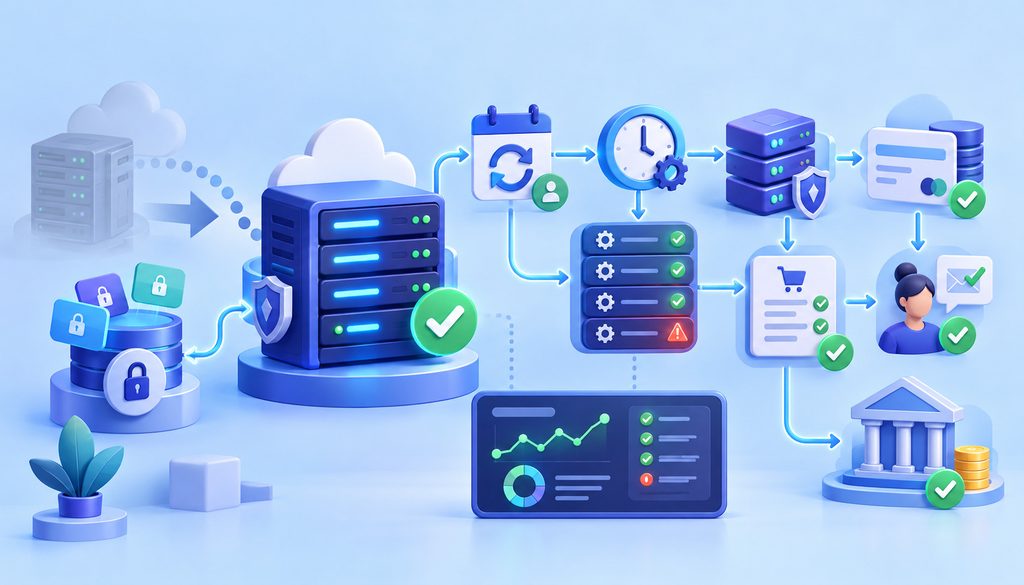
Subscription rows can survive perfectly while renewals stop.
WooCommerce Subscriptions uses scheduled actions for lifecycle events and many automatic renewal flows, while some gateway-controlled subscription models use the gateway to control billing and notify the site afterward.
Check Action Scheduler for pending, failed or overdue jobs; confirm WP-Cron or its server-cron replacement operates; inspect the next-payment timestamps and timezone; verify token references; and review renewal-order and gateway logs.
WooCommerce documentation summarizes the relationship neatly: “WP-Cron activates Action Scheduler.”
A database copy alone cannot prove recurring payments after site migration will execute correctly.
WooCommerce Host Migration Checklist for Payments
For stores using the relevant features:
- Clone files and database.
- Match a supported PHP/runtime environment.
- Verify WooCommerce and gateway-plugin versions.
- Confirm WooCommerce Subscriptions configuration if installed.
- Inspect WooCommerce > Status > Scheduled Actions.
- Verify WP-Cron or server-cron execution.
- Move gateway configuration and external secrets.
- Confirm live versus test mode.
- Verify incoming and outgoing webhook URLs.
- Check saved token records.
- Exclude Cart, Checkout and My Account from inappropriate full-page caching.
- Validate session persistence.
- Test required REST/API routes.
- Validate production-hostname TLS.
- Test successful checkout and a decline.
- Test webhook processing.
- Test a refund.
- Inspect an upcoming or controlled subscription-renewal action.
- Check gateway and application logs.
- Repeat key tests after DNS cutover.
Not every WooCommerce store uses every component.
Caching and Security Rules Can Break Checkout Even When the Site Looks Fine
The new host may introduce different CDN, reverse-proxy, WAF, rate-limit, country-block, or bot-protection defaults. Those infrastructure changes can compound existing checkout performance and Core Web Vitals problems, particularly when customer-specific checkout responses, payment scripts, or session-dependent pages are handled incorrectly.
Do not disable security globally. Test the actual payment routes and create narrowly scoped exclusions where the ecommerce platform or payment integration requires them.
For WooCommerce, cart, checkout and account pages are dynamic, session-sensitive pages that should normally bypass page caching.
Test the New Host Before the DNS Cutover
Before public DNS changes, validate the migrated store through a hosts-file override or a controlled staging environment and safe deployment workflow so plugin compatibility, database behavior, checkout sessions, and server configuration can be tested without exposing customers to the new infrastructure.
Pre-Cutover Test Matrix
| Test | Expected Result | Must Pass Before Cutover? |
| Product page | Loads correctly | Yes |
| Cart | Persists | Yes |
| Checkout | Loads over HTTPS | Yes |
| Card authorization | Successful | Yes |
| Declined card | Proper error | Yes |
| Webhook | Received and processed once | Yes |
| Order status | Updates correctly | Yes |
| Refund | Reaches gateway/order | Yes |
| Email receipt | Delivered | Preferably |
| Cron/renewal job | Executes | Yes if subscriptions exist |
| Existing saved token | Usable | Yes if stored payments exist |
Staging remains necessary, but temporary domains can change SSL, cookies, OAuth redirects, domain validation and gateway callbacks. Repeat production-domain checks after cutover.
The Three Payment Tests to Run Before Declaring the Migration Successful
- Live payment: where permitted, run a low-value real transaction. Verify authorization, the gateway transaction ID, WooCommerce order creation, order status, receipt and eventual reconciliation visibility.
- Refund: initiate the refund through the workflow your team actually uses. Confirm both the gateway and ecommerce order reflect it. Whether processing fees are returned depends on the processor and contract; verify rather than assume.
- Webhook: confirm delivery, signature validation, successful endpoint response, correct order transition and harmless duplicate delivery.
Avoid Duplicate Payment Events During the Cutover
Retries may reach the new server after DNS changes, while an old host may still be running scheduled tasks.
Use provider event IDs, transaction IDs, application-level locks and idempotent handlers where your stack supports them. Control which environment may execute renewal jobs.
Do not destroy the old host simply to stop its scheduler. WooCommerce provides explicit guidance for placing duplicate subscription environments into staging behavior or disabling the relevant queue runner during migrations.
What to Monitor During the First 72 Hours

Watch gateway authorization failures, webhook delivery errors, retries and duplicates. In WooCommerce, look for pending orders, PHP exceptions, gateway logs, Action Scheduler failures and unusual renewal behavior.
| Signal | What Could Be Wrong |
| Spike in pending orders | Webhook, callback or application issue |
| Payments without orders | Order-creation failure |
| Orders without payment | Gateway/API failure |
| Duplicate orders | Retries or dual-host processing |
| Failed renewals | Scheduler, gateway or token problem |
| 403 webhooks | WAF/firewall/authentication issue |
| 5xx webhooks | Application/server failure |
| SSL warnings | Certificate/DNS/TLS issue |
| Missing payout records | Reconciliation/configuration issue |
Also compare gateway transactions, store orders, refunds and payout records. No single signal proves one root cause.
Have a Payment-Aware Rollback Plan
Preserve the old host and maintain a website backup that has actually been verified for restoration, along with payment configuration, API credentials, DNS records, TLS settings, cron configuration, and the gateway endpoint inventory.
Rollback becomes progressively harder after the new environment accepts orders, alters inventory, issues refunds or runs subscription renewals.
Never casually overwrite a live database with a pre-cutover copy after new orders exist. Reconcile the post-cutover writes first.
Should You Change Your Gateway During the Hosting Migration?
A host migration can expose an obsolete gateway plugin, fragmented reconciliation, unsupported callbacks or unclear operational ownership.
That does not automatically mean the gateway should change at the same time.
| Approach | Advantage | Risk |
| Move host first; keep payment stack | Easier fault isolation | Second project later |
| Change host and gateway together | One transformation window | More variables during failures |
| Move host, stabilize, then gateway | Lower migration complexity | Longer overall transition |
Changing the merchant account or gateway can also affect payment-token compatibility and subscription metadata. WooCommerce itself notes that subscription migration between payment integrations can depend on how customer and payment-method identifiers are stored.
Common Payment Mistakes During Ecommerce Host Migration
Common failures include treating the project as files plus database only; changing DNS before TLS is ready; missing webhook URLs or signing secrets; relying entirely on temporary-domain testing; failing to move environment variables; caching checkout; running cron on both hosts; shutting the old server down immediately; skipping refund tests; assuming raw cards live in WordPress; overlooking scheduled renewals; missing firewall or allowlist rules; changing gateways without a separate test plan; and failing to reconcile the first payouts.
Common Myths About Moving a Store to a New Host
- If the site loads, payments are fine: Page rendering does not test authorization, webhooks, schedulers or refunds.
- Changing hosts means customers lose saved cards: Not necessarily. Tokenized integrations commonly preserve remote payment credentials, but the local references and gateway integration must still remain valid.
- Webhooks automatically follow the domain: DNS may move the hostname, but registered paths, secrets, routing and application listeners still require validation.
- DNS changes happen everywhere immediately: Recursive and local caching can delay observation of new records.
- The new host automatically runs the same cron jobs: Server cron and worker configuration are infrastructure, not simply database content.
- SSL only matters to browsers: Gateways also establish HTTPS connections to webhook and API endpoints.
- A staging transaction proves production works: Production DNS, certificates, secrets and callbacks can differ.
- I may as well change gateways too: Sometimes that is justified, but it increases the number of moving parts during diagnosis.
Example: WooCommerce Store With Subscriptions
Imagine a WooCommerce store using tokenized saved methods, WooCommerce Subscriptions, a CDN/WAF and several webhook endpoints.
The team inventories credentials, URLs and renewal jobs; clones the database and files; confirms the new PHP environment; verifies that the clone is not allowed to process uncontrolled renewals; checks Action Scheduler; tests HTTPS, API connectivity and webhooks; performs the final data sync; changes DNS; places an immediate live transaction; refunds it; then inspects a controlled renewal path.
For the next 72 hours, the team compares gateway events to WooCommerce orders, watches webhook status codes and failed scheduled actions, and reconciles the first settlement data before retiring rollback infrastructure.
If Checkout Breaks After DNS Cutover
| Symptom | First Checks |
| Checkout page will not load | SSL, cache, PHP errors, plugin compatibility |
| Card form loads but authorization fails | Credentials, outbound network, live/test mode |
| Payment succeeds but order stays pending | Webhook/callback processing |
| Webhooks show 403 | WAF, firewall, authentication/IP rules |
| Webhooks show 404 | Endpoint path and routing |
| Webhooks show 500 | Application and server logs |
| Subscriptions stop renewing | Cron, scheduler, gateway mode, tokens |
| Duplicate orders appear | Retries and old/new host processing |
| Saved method is missing | Token records and gateway integration |
| Refund fails | Gateway credentials/API connectivity |
FAQs
Will changing hosts break my payment gateway?
It can, even without changing the gateway itself. Runtime differences, missing secrets, TLS, network rules, webhooks, sessions and cron behavior can all affect payment processing.
Do I need to update payment gateway webhooks after migration?
Not always if the public URL remains identical, but every endpoint should still be verified from the gateway side after migration.
What DNS TTL should I use before an ecommerce migration?
There is no universal value. Consider temporarily lowering relevant records sufficiently in advance for the existing TTL to expire, based on your DNS provider and operating requirements.
Can DNS propagation cause checkout errors?
Yes. Different clients may temporarily resolve different infrastructure, which is why the old environment should remain capable of safely handling transitional traffic.
Will customers lose saved cards when I change hosts?
Usually not solely because the host changed when a tokenized gateway architecture is used. The local token references, gateway account and integration still need to remain compatible.
What happens to recurring payments after site migration?
Subscription data can migrate successfully while renewal execution fails because scheduled actions, cron, tokens or gateway callbacks are broken.
Can a bad SSL certificate stop payments?
Yes. It can affect browsers and server-to-server payment traffic, including webhook delivery.
Should I leave the old hosting account active after the move?
Usually for a controlled stabilization period, where feasible. Prevent it from independently processing duplicate scheduled payment work.
How do I test WooCommerce payments before changing DNS?
Use a hosts-file override or controlled staging route, then test cart sessions, checkout, gateway authorization, webhooks, refunds and scheduled actions. Repeat production-domain-sensitive tests after DNS changes.
Migrate Your Ecommerce Site Without Breaking Payments
To migrate an ecommerce site to a new host without breaking payments, validate more than the storefront.
Treat DNS, TLS, credentials, webhooks, callback routes, saved token references, scheduler execution, refunds and reconciliation as parts of one production payment system. Keep rollback infrastructure available, prevent uncontrolled dual-host processing, test real payment lifecycle events, and do not retire the old environment until the new one has survived meaningful transaction and renewal monitoring.